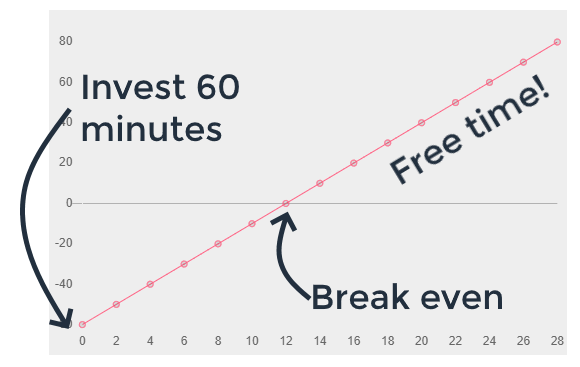
# Introduction Kyuda is committed to guarantee the privacy and security of your data. ## Reporting a Vulnerability If you'd like to report a suspected vulnerability, please contact us. Use our [PGP Key](/privacy-and-security/pgp-key) to encrypt sensitive data as part of your report. ## Reporting an Abuse If you suspect Kyuda resources are being used for illegal purposes, or otherwise violate our [Terms of Service](https://www.kyuda.io/terms), please contact us. Please provide as many details as possible, including: * The specific issue you're seeing and at what date and time it started or when you first observed it. * Relevant resources involved in the abuse (e.g. the HTTP endpoint to which traffic is being sent). * Any logs or code involved in the abuse (e.g. if you're encountering a denial-of-service attack, please include any HTTP / networking logs related to the issue. If you are reporting malware that exfiltrates data, please include relevant code from that malware or links to relevant reports). ## Compliance ### SOC 2 Kyuda will undergo regular third-party audits starting Q2 2023. We will have demonstrated SOC 2 compliance and we will be able to provide a SOC 2 Type I report upon request. [Drata](https://drata.com/) will be used to continuously monitor infrastructure's compliance. ### GDPR #### **Data Protection Addendum** Kyuda is considered both a *Controller* and a *Processor* as defined by the GDPR. As a Processor, Kyuda implements policies and practices that secure the personal data you send to the platform, and includes a [Data Protection Addendum](https://www.kyuda.io/dpa) as part of our standard [Terms of Service](https://www.kyuda.io/terms). Kyuda's [Data Protection Addendum](https://www.kyuda.io/dpa) includes the [Standard Contractual Clauses (SCCs)](https://ec.europa.eu/info/law/law-topic/data-protection/international-dimension-data-protection/standard-contractual-clauses-scc_en). These clarify how Kyuda handles your data, and they update our GDPR policies to cover the latest standards set by the European Commission. **Submitting a GDPR Deletion Request** When you delete your organisation and account, Kyuda deletes all your personal data on hold in our system and our [Subprocessors](/privacy-and-security/subprocessors). ## Hosting Details Kyuda is hosted in [Amazon Web Services](https://aws.amazon.com/) (AWS). The physical hardware powering and storing the data of our platform are hosted in data centers controlled and secured by AWS, under strict [security practices and compliance certifications](https://aws.amazon.com/security/). Kyuda further secures access to AWS resources through a series of controls, including but not limited to: multi-factor authentication, private network inaccessible from the public internet, mandatory VPN, and more. ## Intrusion Detection and Prevention Kyuda uses [AWS WAF](https://aws.amazon.com/waf/), [AWS GuardDuty](https://aws.amazon.com/guardduty), and [Datadog](https://www.datadoghq.com/) to monitor and block suspected attacks against Kyuda's infrastructure, preventing denial-of-service attacks. Kyuda implements a number of industry-standard and custom alerts to detect anomalous activity on the platform, and quickly reacts to potential threats following a strict [#incident-response](#incident-response "mention") policy. ## User Accounts, Authentication and Authorization When you sign up for a Kyuda account, you are asked to select an existing [Google](https://google.com/), [Github](https://github.com/) or [LinkedIn](https://www.linkedin.com/) account. Kyuda does not store any passwords tied to your user account — That information is secured with the identity provider. We recommend you configure two-factor authentication in the provider to further protect access to your Kyuda account. ## OAuth Grants, API Keys and Environment Variables When you link an account from a third party application, you may be asked to either authorize a Kyuda OAuth application access to your account, or provide an API key or other credentials. This section describes how we handle these grants and keys. When a third party application supports an [OAuth integration](https://oauth.net/2/), Kyuda prefers that interface. The OAuth protocol allows Kyuda to request scoped access to specific resources in your third party account without you having to provide long-term credentials directly. Kyuda must request short-term access tokens at regular intervals, and most applications provide a way to revoke Kyuda's access to your account at any time. Some third party applications do not provide an OAuth interface. To access these services, you must provide the required authorization mechanism (often an API key). As a best practice, if your application provides such functionality, Kyuda recommends you limit that API key's access to only the resources you need access to within Kyuda. Kyuda encrypts all OAuth grants, key-based credentials, and environment variables at rest in our production databases. Those databases resides in a private network. Backups of those databases are encrypted. The keys used to encrypt those databases is managed by [AWS KMS ](https://aws.amazon.com/kms/)and controlled by Kyuda. KMS keys are 256 bit in length and use the Advanced Encryption Standard (AES) in Galois/Counter Mode (GCM). Access to administer these keys is limited to specific members of our team. Keys are automatically rotated once a year. KMS has achieved SOC 1, 2, 3, and ISO 9001, 27001, 27017, 27018 compliance. Copies of these certifications are available from Amazon on request. When you link credentials to a specific source or workflow, the credentials are loaded into that program's [#execution-environment](#execution-environment "mention"), which runs in its own virtual machine, with access to RAM and disk isolated from other users' code. No credentials are logged in your source or workflow by default. If you log their values or export data from a step, you can always delete the data for that invocation from your source or workflow. These logs will also be deleted automatically based on the event retention for your account. You can delete your OAuth grants or key-based credentials at any time. Deleting OAuth grants within Kyuda **do not** revoke Kyuda's access to your account. You must revoke that access wherever you manage OAuth grants in your third party application. ## Execution Environment The E*xecution Environment* refers to the environment in which your sources, pipelines, and other Kyuda's code is executed. Each version of a source or pipelines is deployed to its own virtual machine. This means your execution environment has its own RAM and disk, isolated from other users' environments. \ \ To implement virtualisation and achieve such level of isolation securing your execution environment, Kyuda uses [Firecracker](https://firecracker-microvm.github.io/): an open source virtualisation technology that is purpose-built for creating and managing secure, multi-tenant container and function-based services. ## Encryption of Data in Transit, TLS (SSL) Certificates When you use the Kyuda's [web application](https://app.kyuda.io), the traffic between your client and our services is encrypted in transit. When you create an HTTP interface in Kyuda, the UI will display the recommended HTTPS endpoint. All Kyuda's certificates used to protect user data in transit are created using [AWS Certificate Manager.](https://aws.amazon.com/certificate-manager/) Private keys are managed and secured by AWS. ## Encryption of Data at Rest Kyuda encrypts customer data at rest in our databases and data stores. The keys used to encrypt those databases is managed by [AWS KMS ](https://aws.amazon.com/kms/)and controlled by Kyuda. KMS keys are 256 bit in length and use the Advanced Encryption Standard (AES) in Galois/Counter Mode (GCM). Access to administer these keys is limited to specific members of our team. Keys are automatically rotated once a year. KMS has achieved SOC 1, 2, 3, and ISO 9001, 27001, 27017, 27018 compliance. Copies of these certifications are available from Amazon on request. ## Email Security Kyuda delivers emails to users for the purpose of email verification, error notifications and more. Kyuda implements [SPF ](https://en.wikipedia.org/wiki/Sender_Policy_Framework)and [DMARC ](https://en.wikipedia.org/wiki/DMARC)DNS records to guard against email spoofing and forgery. You can review these records by using a DNS lookup tool like `dig` ```bash # SPF dig kyuda.io TXT +short # DMARC dig _dmarc.kyuda.io TXT +short ``` ## Incident Response Kyuda implements incident response best practices for identifying, documenting, resolving and communicating incidents. Kyuda publishes incident notifications to our [Status Page](https://status.kyuda.io/). Kyuda notifies customers of any data breaches according to our [Data Protection Addendum](https://www.kyuda.io/dpa). ## Software Development Kyuda uses GitHub to store and version all production code. Employee's access to Kyuda's GitHub organisation is protected by multi-factor authentication. Only authorised employees are allowed and able to deploy code to production. Deploys are automatically tested and monitored before and after release. ## Vulnerability Management Kyuda monitors code, infrastructure and core applications for known vulnerabilities and addresses critical vulnerabilities in a timely manner. ## Corporate Security ### Background Checks Kyuda performs background checks on all new hires. ### Workstation Security Kyuda provides hardware to all new hires. These machines run a local agent that sets configuration of the operating system to hardened standards, including: * Automatic OS Updates * Hard Disk Encryption * Anti-Malware Software * Screen Lock * Monitoring and Auditing ### System Access Employee access to systems is granted on a least-privilege basis. This means that employees only have access to the data they need to perform their job. System access is reviewed quarterly, on any change in role, or upon termination. ### Security Training Kyuda provides annual security training to all employees. Developers go through a separate, annual training on secure software development practices. ## Data Retention Kyuda retains data only for as long as necessary to provide the core service. Kyuda stores your pipeline code, data in data stores, and other data indefinitely, until you choose to delete it. Event data and the logs associated with pipeline executions are stored according to the retention rules on your account. Kyuda deletes most internal application logs and logs tied to subprocessors within 30 days. We retain a subset of logs for longer periods where required for security investigations. ## Data Deletion If you choose to delete your Kyuda account, Kyuda deletes all customer data and event data associated with your account. We also make a request to all subprocessors to delete any data those vendors store on our behalf. Kyuda deletes customer data in backups within 30 days. ## Payment Processor Kyuda uses [Stripe ](https://stripe.com/)as payment processor. When you sign up for a paid plan, the details of your payment method are transmitted to and stored by Stripe according to their [security policy](https://stripe.com/docs/security). Kyuda stores no information about your payment method. # Security Best Practices Kyuda implements a range of privacy and security measures meant to protect your data from unauthorised access. Since Kyuda's pipelines, sources, and other resources can run any NodeJS, Python, Go or Bash code and process any event data, you also have a responsibility to ensure you handle that code and data securely. We've outlined a handful of best practices for you. ## Store Secrets in Accounts or Environment Variables Even if your pipeline code is private, you should never store secrets like API keys in code. These secrets should be stored in one of two ways: * If Kyuda integrates the with app, use connected accounts to link the app / API. * If Kyuda doesn't integrates the with app, use environment variables. ## Transfer Data Securely Whenever possible, encrypt data in transit to Kyuda (e.g. use HTTPS endpoints when sending HTTP traffic to a pipeline). When you connect to APIs in a pipeline, or deliver data to third-party destinations, encrypt that data in transit (e.g. use HTTPS endpoints when sending HTTP traffic to third parties). ## Add Authentication to Incoming Event Data You can add many public-facing triggers to your pipelines. For example, when you add an HTTP trigger to your pipeline, anyone with the associated trigger URL can invoke it. You should protect your pipeline with an authentication mechanism like [Basic Auth](https://en.wikipedia.org/wiki/Basic_access_authentication), [JWT](https://jwt.io/), or others. This pattern is typical for protecting pipelines: add the authentication logic in a step at the top of your pipeline, ending early if auth fails. If auth succeeds, Kyuda runs the remaining steps of your pipeline. ## Validate Signatures for Incoming Events, Where Available Many apps pass a signature with event data delivered via webhooks (or other push delivery systems). The signature is an opaque value computed from the incoming event data and a secret that only you and the app know. When you receive the event, you can validate the signature by computing it yourself and comparing it to the signature sent by the app. If the two values match, it verifies that the app sent the data, and not some third party. Signatures are specific to the app sending the data, and the app should provide instructions for signature validation. Not all apps compute signatures, but when they do, you should always verify them. When you use a Kyuda source as your pipeline trigger, Kyuda should verify the signature. You can always audit the code behind the event source to confirm this, and suggest further security improvements that you find. See [Stripe's signature docs ](https://stripe.com/docs/webhooks/signatures)for a real-world example. ## Audit Code or Packages you Use Kyuda pipeline are just code. Kyuda provides prebuilt triggers and actions that facilitate common use cases, but these are written and run as code within your pipeline. You can examine and modify this code in any way you'd like. This also means that you can audit the code for any triggers or actions you use in your pipeline. We encourage this as a best practice. Even code authored by Kyuda can be improved, and if you notice a vulnerability or other issue, you can submit a patch or raise an issue. The same follows for [npm ](https://www.npmjs.com/)packages. Before you use a new npm package in your pipeline, review its page on npm and its repo, if available. Good packages should have recent updates. The package should have a healthy number of downloads and related activity (like GitHub stars), and the package author should be responsive to issues raised by the community. If you don't observe these signals, be wary of using the package in your pipeline. ### Limit What You Log and Return From Steps Kyuda retains a limited history of event data and associated logs for event sources and pipelines. If you cannot log specific data in Kyuda for privacy or security reasons, or if you want to limit risk, remember that Kyuda only stores data returned from or logged in steps. Specifically, Kyuda will only store: * The event data emitted from event sources, and any `console` logs / errors * The event data that triggers your pipeline, any `console` logs / errors, step exports, and any data included in error stack traces. Variables stored in memory that aren't logged or returned from steps are not included in Kyuda logs. Since you can modify any code in your Kyuda pipeline, if you want to limit what gets logged from a Kyuda action or other step, you can adjust the code accordingly, removing any logs or step exports. # Subprocessors | Service | Scope | | --------------------------------------------------------------------------------------------------------------------------------------------------------------------------------------------------------------------------------------------------------------------------------- | -------------------------------- | | [Amazon Web Services](https://aws.amazon.com/financial-services/security-compliance/compliance-center/?country-compliance-center-cards.sort-by=item.additionalFields.headline\&country-compliance-center-cards.sort-order=asc\&awsf.country-compliance-center-master-filter=*all) | Cloud Hosting | | [Google Cloud Platform](https://cloud.google.com/security/compliance) | Cloud Hosting | | [Userflow](https://userflow.com/policies/security) | Onboarding | | [Snowflake](https://www.snowflake.com/snowflakes-security-compliance-reports/) | Business Analytics | | [Datadog](https://www.datadoghq.com/security/) | Application Monitoring | | [Sentry](https://sentry.io/security/) | Application Monitoring | | [Stripe](https://stripe.com/) | Payment Processor | | [HubSpot](https://legal.hubspot.com/security) | Customer Relationship Management | *Last updated September 1, 2022* # PGP Key ``` -----BEGIN PGP PUBLIC KEY BLOCK----- Version: Keybase OpenPGP v1.0.0 Comment: https://keybase.io/crypto xsFNBGMaP5ABEADzXGwP9JlPvAJ6IiT5+FqCNVzkWK0N7ONCvscWC8vYwtdrgiWM 8kB2MW69WFcjQAyBR7SGRrEd2jnPEdrmMZ+VRMmlUohohvjOW78qJORJSvT7w9bW 4i2tO/oIiA1j8HQ7jmQl4E+KehwLTUl7CIkFJhVjKKYvPegCdmFTny5kOTS32ZD9 MZUd/85G1Y26dhyKHu2H6/JftrjUzCTZSNpUWmlafdM2nnedqUT1q/ixwifG778H zqyS6b+/C5E6MA+pZvJCRY61t3PFdmVCUe8OkA5c2jcJvhPfSQ4qnImuafL6xvsH Iz3tLVUNeLEmAwVolNf6EdJrCid67rZyJNLsvBe4mgmMzShl25jzLG0VKpCSLIiy uEp1gaJ652xQhWsKkeYIh2e4hyMkwDNxFpeBZT7FVZnikKxtErSRimuvwyqjr5id 3B+/3fD9XRhkEupyZTT1UXoSvbZWMtTwH/ilkQUb1/8YkiGY3GqouT44JJBJOVuQ bjsGv0KU+KLpJqKwf+T0N5M6hwRDFvTfc7JvhKknBExjkqHnAb2Vd+Rm7nEZe9r0 t6X2R1+O1gMW7m+3D9lydi7Pah72Gv4SEkYG5xaRoyBLk8c/iD60MaBkY64uSlz7 2/cUL2yw4/n/O2sg+aQbBE2ggWURSv+OmNYFhmY1qtj6J2bXVCKfAX68VwARAQAB zSJLeXVkYSBTZWN1cml0eSA8c2VjdXJpdHlAa3l1ZGEuaW8+wsFtBBMBCgAXBQJj Gj+QAhsvAwsJBwMVCggCHgECF4AACgkQpmm96XTlYaDcuhAAvnNVJc2H3oYBVGyB JtSyic/s+FUePgF0nfBh5qklEk72isg/wGdiMPhOlzgpwBPnPAqMTeXQ3RaxQZjs hFK7Mkj+bJqZxIiLajOjpG5vTK82j1zRMCO/c7theuYuILWGx22ThUvpaImhddq2 trNGf4c40mAyNagvQAvL/JeNE/UZzbZtObTjGs9M1L12nlokMiChHST25XfGxaIt Z3Aj7Wv+0LxxV705tcozt1myq4ppu6WS2Flye66KKlkElkWs1QlQqGu1WCAvVVxn hRPLZup2i569Ma9zL8huJrVi/Yt6+VYDp86Q1myd5ve898rApzm2+6rHri3/Tw2b 0lmD/4pQp5ZhVZxS5cT7VaX5qLBQdkJbjRhVsi7PB+Uft0BGPW5OPTzeAiDIObXN ko7bMEN/4pyVk2fD6/atzRdIDHHlytFr+QEBn7VYJ/0NPH9UeJGKu4Vr0O0/YtDF po2PQHhZxtM+Leuc47sEXMbVhjfEjhBgxykuMvTwVET6LK+Vm25sN7845PsRSbcl OOgnCYRsnER2TivA4JwuWStmAoor/M1yBk7Qywrv7hM96PZu05ckc+aPw1f+9zCQ e2fCp+zW+TqBmFdwwrKQgW0v0F6ccEdU9bXoMfi5OluB7yUHiB550v7Sm1Eol8W1 9EkCnyt19eAwFZJ4yvgWWTBx7x7OwU0EYxo/kAEQAKlQPyYUA+3AmTJkb6pPsq8T 3RoeIBoTv5n2YJuL+18ZCPh1Z5yFKof19oOeI3ryBi3oOi/nuk9sIa5hJLRkhDQ2 c0vDOgwv16p8Ghzfxw6osKOEAqlCONrA/R47cS/53Pg9MAbTM137stYdBcDTfI2y k9DVe6mpDYkMNiYqWfqKRWmnp6F5EHMBKbhdMJ7MgpKng9PrnzpaZd4yi6ttdlVQ 72JtX3RrNNiGqswEQSoRFmX3Oly+66CwnusP8gX4xIJ3qS+21ZKY0+j2N7OnSvbv PvZON8PJe2DGCRdcOVfIiiu/6ewK9GLEZNH+9bSY74fqYfw2/aDtKSB+zbPI2mfW yqTeNWQ4WuXgTNjy2FLGILJA9l++Go92P5rg1yeYqLEU3EZfBiQie09CkzT4Lhx2 jFIMTwKNFwVilAzVPMAotZNtlzm3FW5NQN18MXBoHZCBzOQnYaS6UJOzk9fynJed prqtiZAuYSSnmCLos3FbX2g71BDNVlklULi6/UVJAHiHblV9fdEq2X3GXZH7d3c+ 9RN695SSwQ+52wPTUaEp/o5Niw2olGQz7x+bls3aSRAI3Y7SLIeXr6+JFAIUa15h jldeBqP7GFB1s6iHrFcB7WHJFp2/Ipqt4r69pwF8C12+VPq90bvCpCYTiHstxEBn W4V+mssOkUOeUUJNBAcHABEBAAHCw4QEGAEKAA8FAmMaP5AFCQ8JnAACGy4CKQkQ pmm96XTlYaDBXSAEGQEKAAYFAmMaP5AACgkQ8ggPgM+F3Yb/pQ//TqpVacyomHCb T8Ga3jJHetqhBBBchtWxh0MeCATGeWZh+zrWqDOKzTwzd0eT+VZHKzemDLa2vNNd eEKhbKaOdx8J/N2u1T1wdc/vPc88Lcn5J1OyFkeyTaTmGr2BFwIHlpTGlFhiT9Uf 0mdu45GYF8QJOXwSbhJ3jtU30rXT7X42ryZuGZmnNfKauooEtLPmu+FyjP4YQKRp EoIJdcQKjjFejS26KnbBUiO/rxhikja2X1iGDfBUu6NR742snEcZ2UmIDAgzTRbo 9Oeb2U7kBNUYQwTJmtsMOveBctzNtSja1Cja3U/Qrix8k1wOyJBvqrz4+nL6qTgA 1HDd1WM1hi6uPHCFjft54LjEHuY68WGFusBvkfFJ3B6IBEqQy+g0/H8Ly+t6vuuD iDsmVBQGiUlm4I26dHO4K9lWdBCWSy652NvbGB9Enb016iNJ01lzIPJcLTrjFETD wMYc30+PFJ/wzHafCU2+pVs+xm0JWHEwv0u9h1JE7RSx9lgfOchPBMq8OuQRLKqt yTXT5ynfDFRrndOECGIie6Nht7KPkYJEbeHv5eH6LkkJRDsgWf+EQso32QwrbAVX Ck1DTrxah6vVJyGrmzIsvR11v1mMai7O5S4PgZpGkgSrl8seaL8/XjOrmHxrtztm Yq1ArwcD0tABLzNT37aLDo4/rwEL9MfaWg/9FPcqIk72mjdIoJU++wNcQwyYqkAD ftzugzzJNwdXvlhVZ0Qk/TNeihBcHvncDUvV4iJ117ZuaAj8MoPJxBf9CXBvHleE R+BmEX3ZEP+JG1/QFufH8+hOKrhzy3jQCbwqGSNVLoPD7HvA8EPyCoEU2XObO0T/ jJSfh1GxpLS/FpTTqv0Aa6L1Tu1N0xhD7kJlQxdy9BLShLnLq27ysEjwmUqVBcO3 xG0HhJS120AJZmW/Aw2s0+n7I6fMmJuoLLPOSTFPYZRdKClvc0Bgpts2pNPv2gGK mRRPdevUO5XhdfjjVS8W9pmPwnc3QdrhjIhgX+aTvdkT7taDb+J9T/QrwC1bPgnS vKBhW69fEgBYhoBqN54edNFQQU/d/Sq8KiQNce+L4E4r3CqHOsq0aWWQdIKEJtzd PpfFxt1trGihGV3ePXKANniGGPEqXcZ58KMvCc7Jxwbul01dIyvZApWKkWMEmaln vmVE4Tbm8Cj8n+jLU/8gQEopSJjQFp7SELdDHBB+izkU0fd6TY7jWBZ5As9OmC8L TTp8cqFl+tXXexKZkvy5b6rv9fkeUw+UWZIoR323ZxNwBCULP75+u2i3FXH2t66P j9JPti6YOQZyInEpuHJYqzqKNwiOLSrnuVudwBvU+5Ci75Cr0y8TFsdNciMN2ytC Qoqw2whDWeeC3aDOwU0EYxo/kAEQANQ7mu+FdaIeR2/vsUpME0Fngjb+akQcsJvq iSkTU0eszfg7obkXsGFJlon0zSAFhck2O0kT8EQ08RS+1h//VoMkjfjvRK+Ee7G6 aKhbI9v2fw2KDTqCi7iaiukVvQS/vjZM/54hE1qNHfKxDF7es5uRXMKwbvcDwKad 4uSgnIzZO7wnqcE4MFHe3Vlpy/TGoNgLh7v5aGHyPUMd11zdb3epzhqseqZ6Kdnv QkFJGLnSdb1U/lfvr1mWEMn/uzoLAsYmzwYrjHVRA9aOuHxAViRPVqGHJ16sbkFP QfDgfvzykEH/OjqemkPFj9WbitYAX3nkX34Z/zsoqnKEs5x+MVwfOxonA5Ll5Keb FtcYChTh4asL/nMPJ/6H325ZEgeMHZsIVN6JjNGjI0G46zyRwXh7phNr9nSbo3uL HnQCY5tvTUAPiatTEFS1JaekboQ6hhfsRA/gUNRNeOXsUg3iNDEWfQmZMEbkrYJR Mro7K9cSTL4SAfxBg+AlHDoYLgz1Q8+Ehx7R0cSbV0LiaVgK7TTb7lV0rbqLeow0 oN6MptzsLIEbqHsuloFNiV+y4DviAXwDMPFJadd8fXchfXUKwkeVekfJmRiNShP+ XLrreJpkHThtnMRHtYrWUVpfjUAJglUrih5YIf1/A1mTmCrjFTzTvRHqwuf5h0M6 scmUzPP1ABEBAAHCw4QEGAEKAA8FAmMaP5AFCQ8JnAACGy4CKQkQpmm96XTlYaDB XSAEGQEKAAYFAmMaP5AACgkQclXARfj/c9T51RAAkhxvB6bV9PQT/PDP0vw1Jj9L egpjFxnotWiYJiYKyKJt3k6QauboFoFDbBgVg2rqwXf/getv9Qw0gr/LSTFCw34Y JNtMTbKzGLyj3p28fw6PFbU+6OiHK7Pheh+NWDqrMJmiOT0JnhYgrRRtfFTLQJkf o4k6RDl++/cJBl/30u9faI/aNYian6vTAeEsCNCldYivHdo5PH8DWzfpG+AfEkq/ FimPS4snRvmBq0JDqCueZ0B7fJ8ihdh2T7IYexZKlBHVwetC44iO+2HDM7m9DSqG WfNucjV/fa2QFN94ubxHYO2rDuH/hXocoGwkNynIDiA4Wlvckz9ypou4+xH3ZqNV 6ZtUoWXq10xokSiDLCeNOYGH3nPLd82lPG3X4ou1zfCHcleGQAF074dVxUDJW1XW Sk0p2cRyfJenjiV7SblsMQ9NkjTGFTE38OpM35S3UxKkOCX6mLIcrq+klmkwshsL 941R3W7g/EN84FZjuxt+CkY17dR0lI6Mc3hvw5Wmkx5ddMXwFim8p0goImcfduyj mXQRgEg/PRcCtf94jiwycQwuVE+D4u2YF+XR7JVV19lQdElFiuYnlS6EhJe/wCiu wCglAyZ0ZTv4RPbp5iHBnAMoVF7ZW5Tvuyeg/BvI4H0YFoE4muNOwQ5Q+A3eJpLJ 6YFuwA9wWlvXbJZO8HlzNBAA1SWD5ibJyRvnv7FbbQeuIOGn+/XPUZ94eSGSPwV/ pRSeMvFmJYnC5Yf/Ohw2VoEvEbDatXWK7L2yuZuBuHt4JAeaD/+yReo4m5tB8xHS zd1TAJJRw1Pztx1lyaQpwkA1bH9BeZhEOdwuK19R+WVHfcudrwckATaUk+6t0Bf9 5ZVjBGsgYlT9yGCK00hy6bYc42nP7/8cUhHmY1+rt7ktqb5XhkRHxUs7qq97juC8 pt0PyrwK5U4BUcH2d9Pzt1s1C+/yzqWrLp1mMl3Ui5/YhVN6L6V+Ql81lwCx1HGB g5jO+OpCKbegBtOo/99xpKJQV9dWTurhTIGrYG9a72o+AW/nCBf4Y11X/2YN7K91 ZrUuthAbBbIboPCOKDDyxqH04zQy4bSBI3gs29y/gVloKc6S69LwrJ6bUXXQWOOk RyCf+4Ql124Vir58qYHtpdoTSsbWxQwJX8E785H2w+A4LCE7UcGnyxrcFOdpYaFs u1R6sMm/rmFXWKYA1m/wz/MJlVLeOS/yKTvDpleiKNoTPNdCBo4czbFGBwVnnoBu 12IgjqB0y1Mbr9COeZ8YyTSfdhbQf3mZRyxB8+Go1ff40bxzhYqaGaNvDW/Cx5k9 YR+ESEy158OXD3uJ5rDnR6sZttJtKOjTBqtRYNSOjlb/pKDMf10iREC7T1OH2By5 uQk= =EVF1 -----END PGP PUBLIC KEY BLOCK----- ``` # Productivity 101 There’s a dumb question people always throw around. *“What’s your superpower?”* There’s a chance that I think this question is dumb simply because I got given a crappy superpower. Mine is: **The willingness to put in a lot of research + an oversensitive BS detector that helps discover the best tools and products for the price.** I told you it was a crappy superpower. This list below are the products I use, and *why* I chose them over others. They aren’t the cheapest, nor are they the most expensive. They are awesome products that are priced well. Of course some of these are referral links. ## **Automation** I can’t not start with automation. * [Zapier](https://csnare.com/zapier). Loads of apps. Simple to use. * [Integromat](https://csnare.com/integromat). Incredibly powerful. Compared to Zapier it’s harder to learn, but cheaper. * [AirTable](https://csnare.com/airtable). A place to store information that’s better than Google Sheets in many ways ## **Productivity** * [TextExpander](https://csnare.com/textexpander) for spending less time typing * [AirTable](https://csnare.com/airtable) for content planning, link building and other things you’d normally do in a spreadsheet * [Calendly](https://csnare.com/calendly) for bookings. The UI for the person booking is still second to none. * [1Password](https://csnare.com/1p) for password management * [Sanebox](https://sanebox.grsm.io/e86lxm9tl6kf) is also great for automatically filtering out emails that don’t need to be in your inbox * [FollowUpThen](https://csnare.com/fut) for automatic reminders if people don’t reply to your emails * [Loom](https://csnare.com/loom) for recording videos for my team, students and anyone really * [Notion](https://csnare.com/notion) for note taking, lists and storing all the things I write. * [ClickUp](https://csnare.com/clickup) for task management, although I’m looking to switch away * [Miro](https://miro.com/) for diagramming. It does the job but I’m not married to it. * Online storage with [Google Drive](https://drive.google.com/). It’s included with our email and it does the job. * [Slack](http://slack.com/) for communication. I still like it better than alternatives * [Xero](https://www.xero.com/) for bookkeeping ## **Marketing & Sales** * [Active Campaign](https://csnare.com/ac) for email marketing & CRM. It has the best automation capability out of any of them, and if it isn’t obvious, I’m big on automation. The email editor is trash though. Really hoping they fix it soon. * [ConvertBox](https://csnare.com/cb) is the best opt in tool I’ve ever used and it’s a one time fee! [Watch my review](https://www.youtube.com/watch?v=I9hIruibWv4) * [Revue](http://getrevue.co/) for weekly curated newsletters. The workflow is ace compared with all others I’ve tried. It’s free now too. Video * [Intercom](https://www.intercom.com/) for support of our SaaS. It’s just nicer and cleaner than other options. It’s also expensive and not without issues. * [Buffer](https://buffer.com/) for social scheduling. It’s so, so simple. I like that. * [Better Proposals](https://csnare.com/bp) for…….. proposals. It’s simple and works. * Ahrefs for SEO & research. [Mangools](https://csnare.com/mangools) if you don’t have the budget for ahrefs * [Rebrandly](http://aktura.tech/rebrandly) for link redirects. Most links on this page go through Rebrandly ## **Learning and coaching** * [GrowthMentor](https://csnare.com/growthmentor) for jumping on calls with amazing mentors * [Feedly](http://aktura.tech/feedly) for finding and curating posts for social and newsletters ## **Fun** * Automated lighting by [Philips Hue](https://www.philips-hue.com/en-au), because it’s faster, more reliable and has more apps etc than others. Good for notifications. # Automation 101 Everybody can do with more time in their day. ## Automation freaking rocks... ... but for a moment, let’s pretend you don’t love it as much as I do. \ \ **Why should you care about automation?** The most important reason for me is time leverage. In other words – **Getting more stuff done in less time**. Automation is a bit like investing money, except with your time. You spend some time now to set it up, and it continues to pay you back forever. There’s more than that though. It helps: * **Take the pressure off** – Everyone is always so busy. They’ll tell you that “there just aren’t enough hours in the day.” You don’t have to deal with this. Automation helps you free up headspace. * **Scale your business** – When you & your team are more productive, it’s easier to justify the next hire. Work on more important things - Nobody likes working on mundane or repetitive tasks. Once you have automated these, you’ll have more time to work ON your business. * **Stay focused** – Switching between tasks is costly to mental energy. Removing tasks from your plate helps you stay focussed on profit-making work. * **Reduce human error** – When humans do things, mistakes will be made. Give that same task to a computer and it’s done right. * **Feel like a wizard** – Seriously. Creating automations is fun. When you make one work you’ll want to do a dance around the office. Maybe that’s just me. ## We’re all too busy Does it feel like you’re constantly busy? “I’m so busy” has become a default response when someone says hello and asks how you are. Some people even wear being busy like a badge – as if it’s a good thing. It’s not. As a business owner you need to focus on the bigger picture from time to time. You need time to think about strategy and direction of the business. **Being “busy” robs you of time to do this**. Even worse, it creates a feeling like you HAVE to be busy all the time. It’s happened to me so many times. I’ll take time off to hang out with friends or family and be anxious the whole time like I should be doing something. They call it “entrepreneurial guilt.” But it can be broken. I began to notice it more once I had started to escape. Once I was on a holiday with some entrepreneurs. Before the first day was over, laptops were out. Of course everyone was working on things that “just had to be done.” We couldn’t even get a single day into the trip before work happened. It was only a 3 day trip. **Being busy sucks. Entrepreneurial guilt sucks. Not being able to take time off sucks.** These are the reasons I love automation so much. It’s how I’ve been able to reduce that guilt and take more time for myself. Being away from the desk and knowing that stuff is still happening is a great feeling. ## The ROI of automation Time is the most precious resource we have. That’s why it’s become so common for people to say they **wish they had more hours in the day**. Of course we can’t make more than 24 hour days, but you can absolutely make it feel like you have more time.
Number of weeks